How to split shared expenses as a couple
Choose an agreement you can both explain
One partner pays rent, the other buys groceries, and dinner comes from whichever card is nearby. Those purchases can be hard to compare without a shared record.
Start by agreeing which expenses you share and how you want to divide them. SplitMyExpenses lets you record the payer separately from each person's share, so paying the bill does not automatically mean owing half of it.
Equal, percentage, or exact amounts?
| Arrangement | How it works | Useful when |
|---|---|---|
| Equal | Each partner owes half | You agree to share that bill equally |
| Percentage | Each partner owes an agreed percentage | You prefer a consistent ratio such as 60/40 |
| Exact amounts | Each partner owes a specific amount | Rent or another bill has a fixed arrangement |
| Itemized receipt | Each item goes to the people who shared it | A shopping trip includes personal and shared items |
You can use different rules for different costs. For example, rent might use fixed amounts while shared groceries use equal splits. Our split methods guide explains the controls for each approach.
Example: an agreed 60/40 split
Suppose you agree that Taylor owes 60% and Jordan owes 40% of a $150 shared grocery bill. Taylor's share is $90, and Jordan's share is $60.
If Jordan pays the full $150, Taylor owes Jordan $90. If Taylor pays the full $150, Jordan owes Taylor $60. The total and the agreed ratio stay the same; changing the payer changes who needs reimbursement.
An income-based ratio is one possible agreement. You could calculate a ratio from the income figures you choose to use, then enter the percentages. SplitMyExpenses does not decide which arrangement is right for your relationship or automatically calculate a ratio from your salaries.
Create a shared group
- Create a group for the expenses you share and add your partner.
- Add a bill with the total, currency, date, and person who paid.
- Choose equal, percentage, or exact amounts for that expense.
- Check that the shares add up to the total, then save.
- Review the group balance together before recording a settlement.
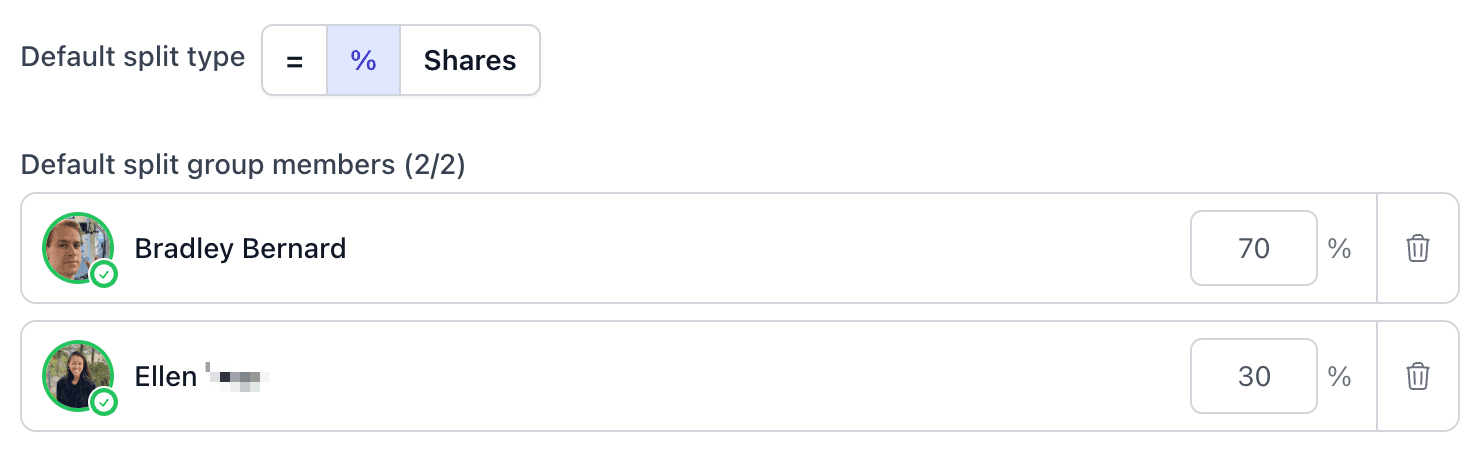
For a ratio you use repeatedly, premium members can configure default group splits. New expenses start with the default, and you can override it for a particular purchase. A free member can see the group's defaults and benefit from expenses a premium member creates, but needs premium access to create or apply defaults to their own new expenses.
Handle repeating and one-off costs differently
Rent or a fixed subscription can use recurring expenses when the amount, participants, and split stay the same. Review the schedule and update the recurring setup if those details change. The free plan supports 10 recurring expenses; see pricing for premium automation features.
A utility bill that changes every month still needs its actual amount reviewed. A receipt with personal purchases needs itemization rather than an automatic household ratio. Follow the receipt splitting guide to assign each item and check the total.
Keep currencies and repayments clear
For a trip together, use the group trip guide. Expenses in different currencies have separate balances. If you want to combine them, agree on the destination currency and rate before using group currency conversion, which requires premium access.
When one partner sends a repayment, record that payment once. Check the actual payment method before treating a balance as settled. You can review the group's debt breakdown if a balance does not look right.
Revisit the agreement when things change
A new job, a move, or different shared responsibilities may change the arrangement you want. Review future defaults and recurring bills together rather than assuming an old ratio still applies. Keep the existing expense history so both people can understand what was recorded.
Create a shared group and record a bill using the split you both agreed on.

Creator of SplitMyExpenses.com