Venmo vs Zelle vs Cash App vs Apple Cash for splitting bills
Short answer
All four apps are free to send money from a bank account, a debit card, or the app balance, according to their own websites. The best one is the app your friends already use. The differences that matter:
- Venmo works on iPhone and Android and can split a group expense with equal or custom amounts.
- Zelle is built into many US banking apps and is typically available within minutes, but payments can’t be reversed.
- Cash App has pools for collecting money for a trip or a gift.
- Apple Cash lives in Messages and Wallet, so it only works for people with Apple devices.
Paying with a credit card costs 3% on Venmo and on Cash App. For a group that shares costs over weeks or months, use a bill splitting app to keep the balance, then pay each other with whichever of these your group prefers.
How we compared
We make SplitMyExpenses, a bill splitting app that hands off to payment apps instead of moving money itself, so we don’t compete with any app on this list. Every fact comes from the app’s own website, reviewed on November 25, 2026: Venmo’s fees and sending money, Zelle’s FAQ and homepage, Cash App’s send page and terms, and Apple Cash with Apple’s support article. When a site doesn’t say something, the table says “not stated.” We couldn’t review PayPal’s fee pages for this update, so PayPal isn’t in the table.
Fees and features change, and some depend on your bank, so check before you send.
Payment apps compared
| Venmo | Zelle | Cash App | Apple Cash | |
|---|---|---|---|---|
| Send from bank, debit, or balance | Free | Typically free; check with your bank | Free from balance or debit card | Not stated |
| Send with a credit card | 3% | Not stated | 3% | Not stated |
| Speed | Not stated | Typically within minutes | Not stated | Not stated |
| Request money | Yes | To enrolled Zelle users | Yes | Yes, in Messages |
| Group splitting | Split with equal or custom amounts | Not stated | Pools for group trips and gifts | Not stated |
| Devices | iPhone and Android app | Your bank’s app or the Zelle app | iPhone and Android app | Apple devices only |
| Where it works | US | US bank accounts only | US residents only | 50 US states, DC, and Puerto Rico |
| Reversing a payment | Not stated | Payments can’t be reversed | Not stated | Not stated |
Venmo
Venmo is the payment app with the most built-in splitting. You can add friends to a group and split a cost with equal or custom amounts, and Venmo calculates each person’s part. Sending from your Venmo balance, a bank account, or a debit card is free, and a credit card costs 3%, according to Venmo’s fee page. It’s the easiest choice when your friends use both iPhone and Android.
Zelle
Zelle is built into the apps of over 2,400 banks and credit unions. It says there are typically no fees, and that money is typically available to an enrolled recipient within minutes. Both people need a US bank account. Zelle’s FAQ is clear that payments can’t be reversed and that you should only send money to people you know and trust, which makes it best for paying back friends and roommates rather than strangers.
Cash App
Cash App says sending from your Cash App balance or a debit card is free in the US, and sending with a credit card costs 3%. Its pools feature collects money from friends for group trips and gifts. Only US residents can create a Cash App account.
Apple Cash
Apple Cash is built into iPhone. You can send or request money in Messages, and Apple’s support article explains how to set up weekly, biweekly, or monthly payments in Wallet, which is handy for a roommate’s share of rent. It needs a compatible Apple device and works in the 50 US states, DC, and Puerto Rico. If anyone in your group uses Android, choose another app.
Is Venmo or Apple Pay better for splitting a bill?
Apple Cash is the part of Apple Pay that sends money between people. Venmo is the better choice for a mixed group, because it works on iPhone and Android and has a group split built in. Apple Cash is convenient when everyone has an iPhone: you can request each person’s share right in your group text.
When a payment app isn’t enough
Payment apps move money once you know the amount. They don’t keep a running balance when different people pay for different things: one roommate pays rent, another the internet, a third the groceries. After a month, nobody knows the net amount.
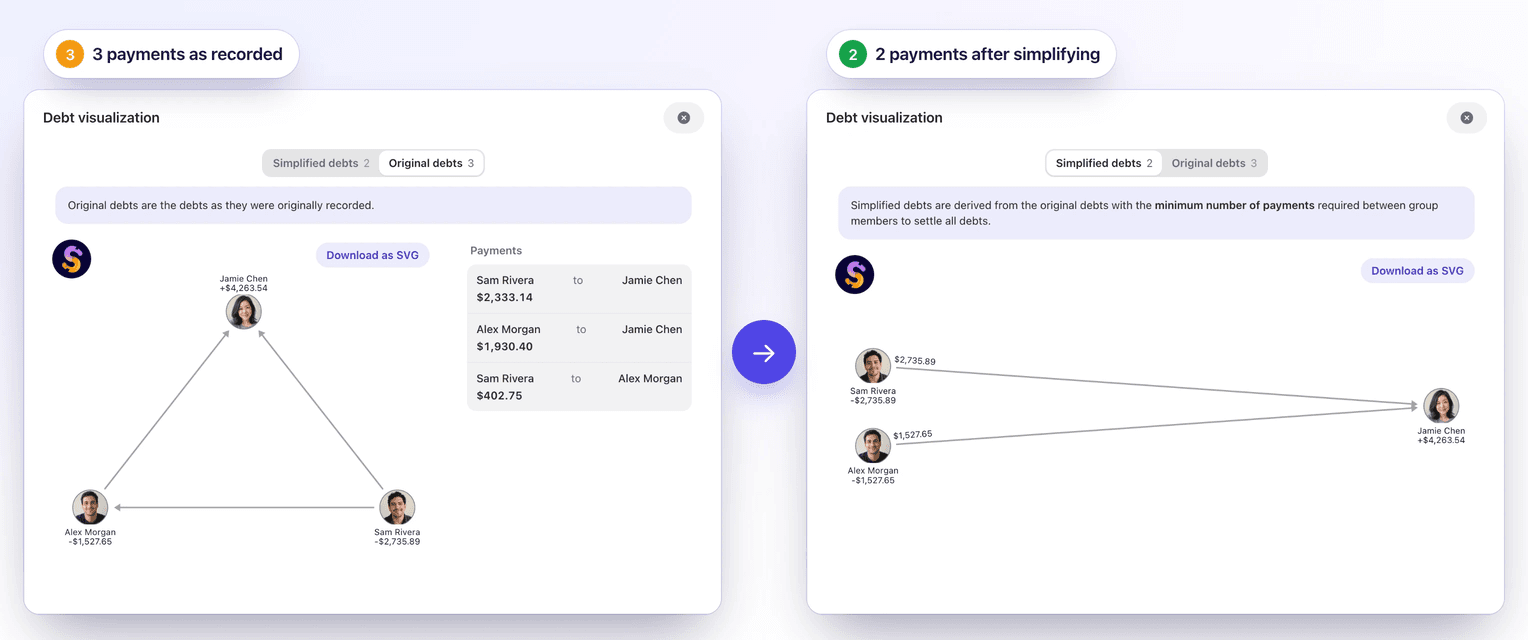
A bill splitting app records each expense, works out who owes whom, and simplifies the debts so the group settles in as few payments as possible. In SplitMyExpenses, three roommates who owe each other in a circle settle with two payments instead of three. You then pay through Venmo, PayPal, Cash App, Zelle, or UPI, or record cash, and the balance updates.
See how to split and charge friends on Venmo, or start with how to split bills with roommates.
FAQ
Which payment app is best for splitting bills?
The one your group already uses. Venmo has the most built-in splitting and works on iPhone and Android. Zelle is fast and already inside many US banking apps. Cash App has pools for group trips. Apple Cash is best when everyone has an Apple device.
Which payment apps have no fees for splitting bills?
Venmo and Cash App are free when you pay from your balance or a debit card, and Venmo is also free from a bank account. Zelle says there are typically no fees, but to check with your bank. Venmo and Cash App charge 3% to pay with a credit card.
Can I split a bill in Venmo?
Yes. Venmo lets you add friends to a group, enter the total, and choose equal or custom amounts.
Can Zelle payments be reversed?
No. Zelle’s FAQ says payments can’t be reversed, so only send money to people you know and trust.
Does Apple Cash work with Android?
No. Apple Cash needs a compatible Apple device. For a group with Android users, use Venmo, Zelle, or Cash App.
Do I need a bill splitting app if I use Venmo?
For one dinner, Venmo is enough. For a household or a trip where different people pay for different things, a bill splitting app keeps the running balance, and you still settle up in Venmo.
Try SplitMyExpenses
Create a free group, add who paid for what, and settle up in the payment app your friends already use. Free on web, iPhone, and Android.

Creator of SplitMyExpenses.com