Venmo Groups vs Splitwise: which one should your group use?
Short answer
Venmo Groups is enough when everyone in your group is in the US, already uses Venmo, and mostly splits costs equally. It tracks shared expenses, works out who owes whom with as few payments as possible, and lets you pay inside the same app.
Use a bill splitting app like Splitwise or SplitMyExpenses when:
- someone in the group doesn’t use Venmo, or isn’t in the US;
- you pay in more than one currency;
- you need recurring bills like rent, itemized receipts, or a history you can export.
You can also combine them: keep the balance in a bill splitting app and settle up with Venmo.
How we compared them
We make SplitMyExpenses, so this compares our app with two others. Every Venmo fact comes from Venmo’s own pages, reviewed on November 27, 2026: Setting Up a Group, Managing Expenses for Venmo Groups, Settling Up Group Expenses, Why Can’t I Join This Group?, and Venmo’s fees. Splitwise facts come from Splitwise’s homepage, its Pro page, and its help center. When a page doesn’t say something, the table says “not stated.”
Venmo Groups vs Splitwise vs SplitMyExpenses
| Venmo Groups | Splitwise | SplitMyExpenses | |
|---|---|---|---|
| What it is | Payment app with shared expense groups | Bill splitting app | Bill splitting app |
| Who can join | Venmo users in the US; Teen accounts and business profiles can’t join groups | Anyone with an account | Anyone with an account |
| Group size | Up to 30 members | Not stated | Not stated |
| Splits | Equal by default; amounts can be edited and members left out | Equal and custom splits | Equal, exact, percent, shares, adjustments, by item |
| Simplifies payments | Yes, fewest payments | Yes | Yes |
| Settle up | Pay inside Venmo, or mark a payment made elsewhere as paid | Record payments; settle in any app | Settle with Venmo, PayPal, Cash App, Zelle, or cash |
| Currencies | US dollars | 100+; conversion is Pro | 150+; whole-group conversion is Premium |
| Recurring bills | Not stated for groups | Listed as a core feature | 10 free; up to 100 with Premium |
| Daily expense limit | Not stated | Up to 4 a day on free | None |
| Web app | Not stated for groups | Yes | Yes |
| Cost | Free to pay from balance, bank, or debit card; 3% from a credit card | Free with limits; Pro is paid | Free; Premium is $3.99 a month or $34.99 a year |
How Venmo Groups works
Anyone in a Venmo group can add an expense, and Venmo splits it equally between the other members by default. You can edit the amounts or leave people out before or after you save it, according to Venmo’s help center. Groups hold up to 30 people, and someone who isn’t already your Venmo friend has to accept an invitation before they’re added.
Venmo then nets everything out. Here’s an example with three roommates in their first month:
- Ana pays the $2,700 rent.
- Ben pays $120 for internet and electricity.
- Chloe pays $180 for the first grocery run.
The total is $3,000, so each share is $1,000. Ben owes $880 and Chloe owes $820, both to Ana, and nobody has to pay each other back and forth. Each member taps Pay in the group, or marks a payment as paid if it happened outside Venmo.
The catch is that everyone needs an eligible Venmo account. Teen accounts and business profiles can’t join groups, and Venmo is a US service.
Where Splitwise is different
Splitwise is a ledger first. It doesn’t move money; it keeps track of who paid what and who owes whom, then you settle up in whatever app you like. That makes it work for friends who don’t share a payment app, and Splitwise’s homepage lists 100+ currencies and recurring expenses.
The free plan has a daily limit: Splitwise’s help center says free users can add up to 4 expenses a day. Splitwise Pro removes it and adds receipt scanning, currency conversion, charts, and search. Read is Splitwise free? for what Pro adds and how it’s priced.
Where SplitMyExpenses fits
SplitMyExpenses is also a ledger, with no daily limit and no ads on the free plan. It runs on the web as well as iPhone and Android, and includes every split method, including itemized receipts entered by hand, and 10 recurring bills such as rent and utilities.
When it’s time to pay, it simplifies the group’s debts into the fewest payments and hands each one to Venmo, PayPal, Cash App, or Zelle, so your group can keep using Venmo for the money.
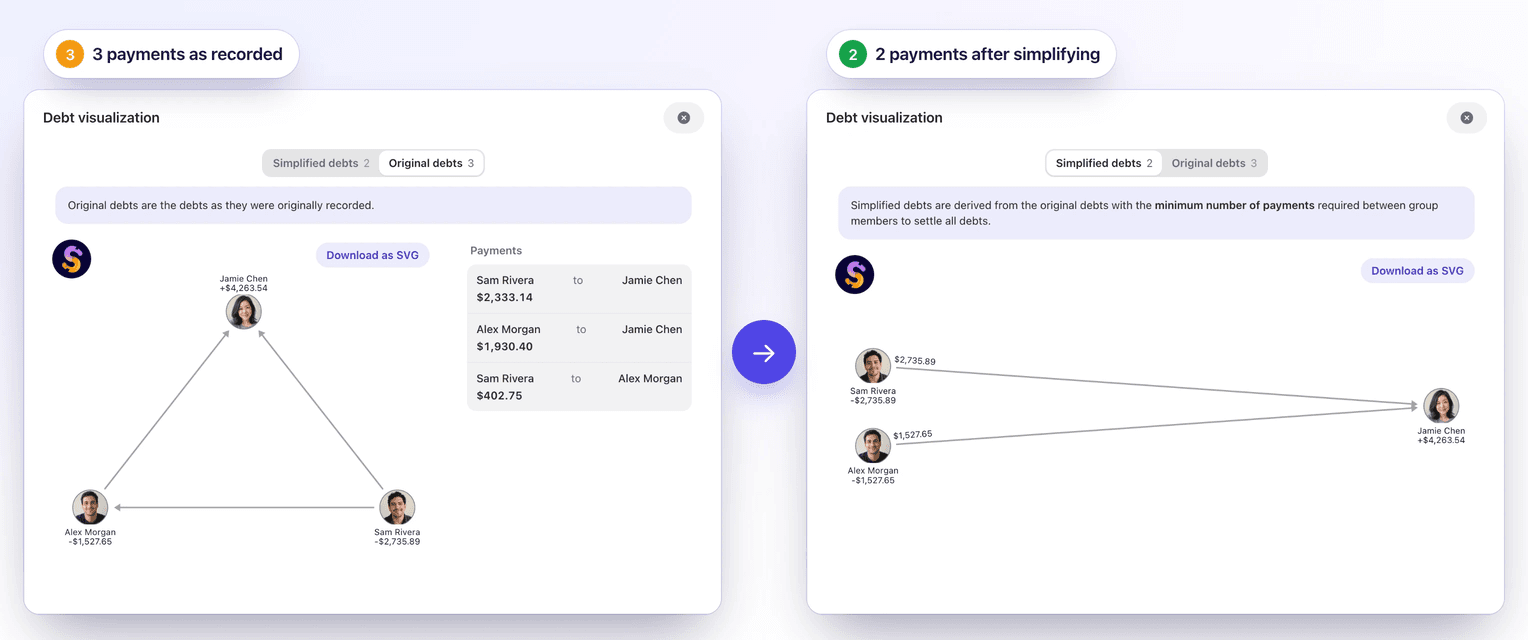
See how to split and charge friends on Venmo for the full settle-up flow.
Which should you use?
- Friends in the US who all use Venmo, for one trip or dinner: Venmo Groups.
- Roommates with rent and utilities every month: a bill splitting app with recurring bills. SplitMyExpenses includes 10 for free. See how to split bills with roommates.
- A trip abroad, or friends outside the US: Splitwise or SplitMyExpenses, which both handle multiple currencies.
- A group already on Splitwise that keeps hitting the daily limit: pay for Pro, or import your Splitwise history into SplitMyExpenses for free.
- People who prefer different payment apps: a bill splitting app, then settle in whichever app each person uses. Our payment apps comparison covers Venmo, Zelle, Cash App, and Apple Cash.
FAQ
Is Venmo Groups better than Splitwise?
Venmo Groups is simpler when everyone already uses Venmo in the US, because expenses and payments live in one app. Splitwise is better when someone doesn’t use Venmo, you need other currencies, or you want recurring bills, though its free plan limits you to 4 expenses a day.
Does Venmo Groups split expenses automatically?
Yes. Venmo splits each group expense equally between the other members by default, and you can edit the amounts or leave people out. It then works out who owes whom with the fewest payments.
How many people can be in a Venmo group?
Venmo’s help center says groups are limited to 30 members.
Can you use Venmo Groups with people outside the US?
Venmo is a US service that pays in US dollars, so friends outside the US can’t join. Use a bill splitting app that supports multiple currencies instead.
Can I use Splitwise or SplitMyExpenses with Venmo?
Yes. Both keep the balance and leave the payment to you. SplitMyExpenses opens a Venmo request for the amount a friend owes, in the Venmo app on your phone or on the web, and marks it as charged when you come back.
Try SplitMyExpenses
Create a free group, add your first expense, and settle up with Venmo when you’re ready. It’s free on web, iPhone, and Android.

Creator of SplitMyExpenses.com